Dyslexia Resources
This journey of learning about dyslexia has been full of more information than I could keep track of! I am putting things here on this page to help myself organize the things I am finding useful for our journey. Hopefully they can also help someone else on their own journey.
Tutoring Services (in the Eau Claire area)
From what I understand...the Children's Dyslexia Center offers free tutoring to children with an official diagnosis of dyslexia. (Diagnosis must be from a pysch
They have centers all over the country, including 4 centers in Wisconsin. (Eau Claire, Superior, Madison, Milwaukee).
This is a FANTASTIC resource....but the wait list is very long!! And the drive is quite far for those of us that live in the sticks. They offer tutoring two times a week for 1-2 years.
I just found out about this resource a few days ago, so I don't know much about it.
I do know that it provides effect OG tutoring, from trained instructors, for students with Dyslexia and is located in Chippewa Falls, WI.
This is not a free tutoring service, and I have no idea what the cost is for tutoring sessions.
Testing Accommodations
Does your child do well on the content of academic testing....but simply run out of time during assessments that have a time limit? If so, your child may be eligible for testing accommodations through an IEP or 504 plan in K-12 schools, or working with the disability office in college.

AP testing
(Advanced Placement Courses)
Adaptive Technology
Through my research for my graduate level training in dyslexia, I have been trying out lots of different adaptive technology resources...hoping to find something that will be of use for my son in high school and college. Here are some of the options that I have found most useful.
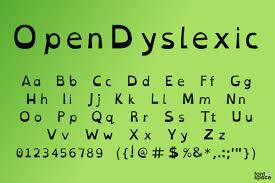
Open Dyslexic is an extension app that can be loaded onto your computer. It changes the font and layout of most of the text on your computer when navigating sites online.
Here are some of the benefits that I have noticed...
- text that is bottom heavy (helps with reversals like b/d)
- highlighter bar that highlights paragraphs as you hover over them
- text movement - arranges the text with more spaces between paragraphs and organizes sentences in easier to read sentence breaks
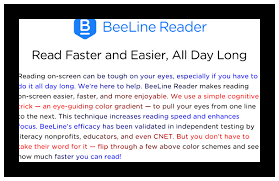
BeeLine Reader is another extension app that can be loaded onto your computer. It adds color to the text to help track from one line to the next. Helpful if you have trouble tracking between lines.
Here are some of the benefits that I have noticed if you use the customization options...
- change text size
- change spacing between lines
- change spacing between letters
- change color options
I plan to use this for my college articles as I think it will help trying to read text that is tiny and hard to read for my aging eyes. :)
Create Your Own Website With Webador